https://www.microsoft.com/en-us/research/project/microsoft-automatic-graph-layout/?from=http%3A%2F%2Fresearch.microsoft.com%2Fen-us%2Fprojects%2Fmsagl%2F#!code-samples
뭐 이쁘장하게 그려주는건 아닌데
NeGet에서 간단히 다운받고 사용하기 쉽다.
Microsoft Automatic Graph Layout
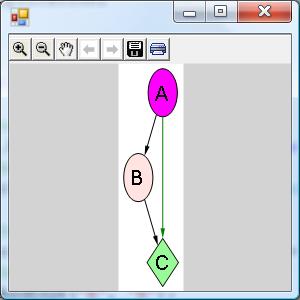
using System;
using System.Collections.Generic;
using System.Windows.Forms;
class ViewerSample {
	public static void Main() {
		//create a form
		System.Windows.Forms.Form form = new
System.Windows.Forms.Form();
		//create a viewer object
		Microsoft.Msagl.GraphViewerGdi.GViewer viewer
= new Microsoft.Msagl.GraphViewerGdi.GViewer();
		//create a graph object
		Microsoft.Msagl.Drawing.Graph graph = new
Microsoft.Msagl.Drawing.Graph("graph");
//create the graph content
		graph.AddEdge("A", "B");
		graph.AddEdge("B", "C");
		graph.AddEdge("A", "C").EdgeAttr.Color =
Microsoft.Msagl.Drawing.Color.Green;
		graph.FindNode("A").Attr.Fillcolor =
Microsoft.Msagl.Drawing.Color.Magenta;
		graph.FindNode("B").Attr.Fillcolor =
Microsoft.Msagl.Drawing.Color.MistyRose;
		Microsoft.Msagl.Drawing.Node c =
graph.FindNode("C");
		c.Attr.Fillcolor =
Microsoft.Msagl.Drawing.Color.PaleGreen;
		c.Attr.Shape =
Microsoft.Msagl.Drawing.Shape.Diamond;
		//bind the graph to the viewer viewer.Graph =
graph;
		//associate the viewer with the form
		form.SuspendLayout();
		viewer.Dock =
System.Windows.Forms.DockStyle.Fill;
		form.Controls.Add(viewer);
		form.ResumeLayout();
		///show the form
		form.ShowDialog();
	   }
	}
요런식 WinForm 만 올리고 WPF 에서 정식으로 지원안하는지 WPF 코드는 딱히 없는듯
걍 WPF에서 winform 띄우기로 했다.
728x90
'프로그래밍 언어 노트 > C#' 카테고리의 다른 글
| [C#] orderby를 활용한 간단한 셔플 (0) | 2018.12.28 |
|---|---|
| [C#/WPF] XAML을 사용하여 WPF에서 Windows Forms 컨트롤 호스팅 (0) | 2018.12.03 |
| [Visual Studio] 메서드 자동완성 기능 플러그인 (C# Methods Code Snippets) (0) | 2018.10.07 |
| [C#] 7.0 새로운 기능 out과 함께 초기화 (0) | 2018.10.07 |
| [C#] auto property (0) | 2018.10.01 |